
What a GLN is
A GLN (Global Location Number) is a 13-digit GS1 number that identifies a business, a department or a physical location, so that computer systems can route information to the right place. In the bike trade it is how DST, your suppliers and your POS know which shop is asking for data. Suppliers authorise GLNs, not shop names or email addresses.
Requesting a DST dealer account
DST is free for bike specialists; suppliers pay for the platform. You need a DST account to read data, and DST offers two routes once you have one:
- Through your POS: you give your GLN to your POS supplier, and the POS fetches DST data. DST says almost every POS system in the trade has a DST connection.
- Through the API: a webshop or product-information system reads DST directly. BikeDist uses this route on your behalf, with your GLN.
You can request an account on DST's account page, or send the request from BikeDist (next section) so the access check runs automatically when your GLN arrives.
Where your GLN comes from
If your POS already reads DST, it does so with your GLN, so ask your POS supplier first. DST's dealer page describes dealers receiving a GL number when they set up the POS route. Companies that are GS1 members can also allocate their own GLNs from their GS1 company prefix.
Adding your GLN to BikeDist
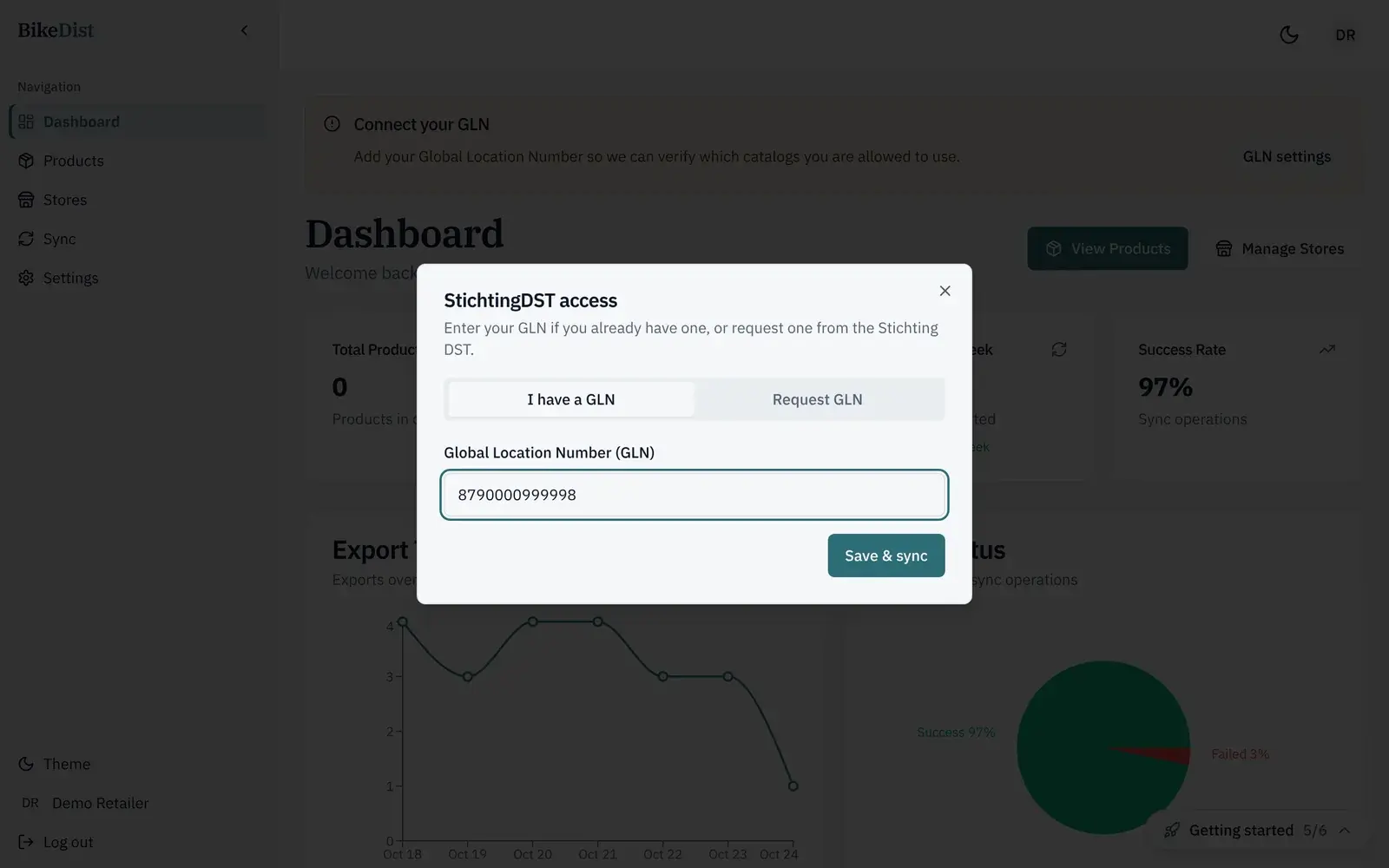
- Sign in to BikeDist. Until DST access is active, a banner at the top says Connect your GLN; click GLN settings.
- On the I have a GLN tab, type all 13 digits and click Save & sync.
- BikeDist asks DST which suppliers have authorised that GLN. A quick check finishes straight away; a longer one runs in the background while the banner says Checking supplier access, and the page updates by itself when it is done.
- When at least one supplier has authorised you, the banner disappears, you see Supplier access confirmed, and the catalogue fills with those suppliers' products.
No GLN yet: request one from BikeDist
Open the Request GLN tab and fill in your company name, contact name, phone, address, postal code, city, country and email. BikeDist sends the request to Stichting DST with a single-use link; DST registers your shop and enters your GLN through that link. Your status shows GLN request in progress until then, and the access check starts as soon as the GLN is in.
How long it takes
| Step | Typical time |
|---|---|
| Access check with a GLN you already have | Seconds to a few minutes |
| GLN request through BikeDist or DST | Usually a few business days, depending on DST |
| A supplier authorising your GLN | Depends on the supplier; ask your sales contact |
Common problems
"No catalog access yet"
DST accepted your GLN, but no supplier has authorised it. Suppliers keep full control over who sees their data, so ask each brand or wholesaler you buy from to authorise your GLN in DST. Then open GLN settings and save again to re-run the check.
"Access check failed"
BikeDist could not reach DST or DST returned an error. Wait a few minutes and save your GLN again. If it keeps failing, contact support with the time it happened.
A brand is missing from your catalogue
You only see suppliers that have authorised your GLN, and DST notes that article data can differ by country. Check with the supplier that your GLN is authorised for the brand, then re-run the access check.
You typed the GLN of another location
Shops with several branches can have a GLN per location. Use the GLN your suppliers know you by; if in doubt, ask the supplier which GLN they authorised.
Next: decide how sizes and colours should appear in your store, in bike sizes and colours as variants.
Related
- DST integration for Shopify and WooCommerceConnect your DST dealer access to Shopify or WooCommerce. BikeDist imports product data, images, sizes and colours and exports them at your prices.
- The Shopify app for bike shops that use DSTInstall BikeDist from the Shopify App Store and publish DST bikes with sizes and colours as variants, EAN barcodes, images and your own prices.
- Import your DST bike catalogue into WooCommerceConnect WooCommerce with a REST API key and export DST bikes as variable products with sizes, colours, images, SKUs and your prices. No extra plugin.
- GLN en DST-toegang aanvragen als fietsenwinkelWat een GLN is, hoe je als fietsenwinkel gratis een DST-account aanvraagt en je GLN aan BikeDist koppelt. Stappen, doorlooptijd en veelvoorkomende problemen.