

Why this question exists: DST has one row per variant
Supplier data in DST is stored per article. A road bike in sizes XS to XL and two colours is ten articles, each with its own article number, EAN, price and stock. Your store, on the other hand, usually wants one product page per model. Something has to group the rows, and decide what the shopper sees.
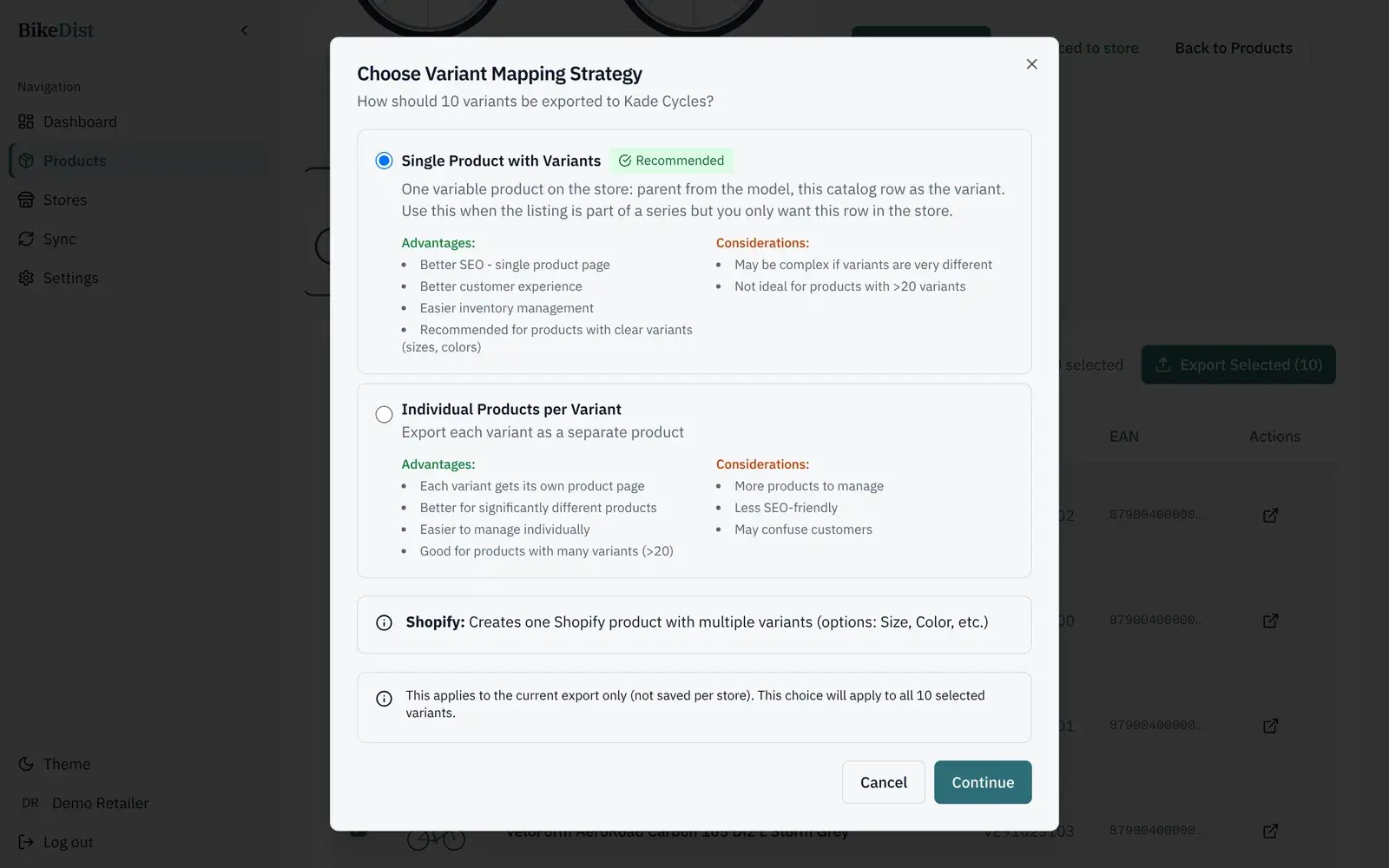
BikeDist groups DST rows by model series and asks once per export how they should reach your store. The two options are below, with the pros and cons the app shows.
Option 1: one product with variants
One product page per model, with options such as Size and Colour. In Shopify each row becomes a variant; in WooCommerce the product is a variable product with a variation per row. Each variant keeps its own SKU, price, stock and image (and, in Shopify, its EAN as the barcode).
- One URL collects the traffic, links and reviews for the model.
- Buyers compare sizes and colours without leaving the page.
- Stock is managed per size, so you do not sell a size you do not have.
Watch out when one model name hides very different bikes. If the variants differ in motor, battery or groupset, the page has to explain several products at once.
Option 2: one product per variant
Every size and colour becomes its own product with its own page. That suits items whose variants are bought for different reasons, or very long lists that would be hard to choose from on one page.
- Each variant can have its own title, description and URL.
- More products to manage, and every one counts towards your plan's synced products.
- Ten nearly identical pages compete with each other in search. Google picks one version to show and combines signals onto it, so most of those pages add nothing.
Which to pick
| Situation | Pick |
|---|---|
| A bike in several frame sizes and colours | One product with variants |
| Clothing or helmets in sizes | One product with variants |
| One model name, different motors, batteries or groupsets | One product per meaningful difference, with sizes as variants |
| Parts sold by fit, such as tyre or chain sizes, with very long lists | One product per variant, or group the most common sizes |
The choice applies to the export you are running, not to the store forever, so you can export a road bike range as variants and a parts range as separate products.
The SEO effect
Search engines rank pages, not products. One strong page per model, with your own description on top of the supplier text, usually beats ten thin pages that differ only in a size letter. Google's guidance on duplicate URLs says it consolidates signals from similar pages into one preferred URL, so the extra pages rarely rank on their own. If you sell a size or colour that people search for by name, mention it in the product copy and keep the single page. More in 10 fixes for bike shop product pages.
Related
- The Shopify app for bike shops that use DSTInstall BikeDist from the Shopify App Store and publish DST bikes with sizes and colours as variants, EAN barcodes, images and your own prices.
- Import your DST bike catalogue into WooCommerceConnect WooCommerce with a REST API key and export DST bikes as variable products with sizes, colours, images, SKUs and your prices. No extra plugin.
- Bike shop SEO: 10 fixes for product pages that rankTen fixes for bike shop product pages built on supplier data: titles, your own copy, images, structured data, variants and speed, from Google’s guidance.
- Add a bike geometry table to Shopify and WooCommerceStore frame geometry in a Shopify JSON metafield or a WooCommerce product field and render a mobile-friendly table. Liquid and PHP included.